What chord is this?

Tap the frets you are holding and the reverse chord finder names the chord, with the diagram, the notes and the sound.

chords compared
166
strings read
6
bass note
detected
signup
none
the identifierarrow keys move, Enter marks the fret

Tap the neck

Two notes or more and the name appears here.

    O open string× mutedTap a fret twice to clear itArrow keys move, Enter marks the fretDrag the neck sideways for frets 6 to 15Try

    What is a chord identifier?

    A chord identifier is a reverse chord finder: instead of typing a chord name to get a shape, you enter the notes you are already playing and the tool returns the name. This one reads the six positions of the neck, converts each one into a pitch, and compares that set of two to six notes against all 166 chords in the library. Matches are sorted into three groups: chords that use exactly those notes, chords that sit completely inside them, and chords that need one more note. When several names fit the same notes, the lowest string decides: E G C is answered as C/E, not C. Naming a shape is worth the ten seconds it takes, because a name unlocks every other voicing of the same chord, the 65 chord pages on this site, and the songs in our library that use it. The comparison runs in your browser, with no signup and no upload.

    166chord shapes compared on every tap
    144root and quality combinations in the library
    3match tiers: exact, inside your notes, one short
    Learn & referenceExamples, charts and deeper explanation

    How do you identify a chord from a shape?

    1. Note three things about the shape. Which fret each string is pressed at, which strings ring open, and which strings you do not play at all. The third one matters: an unplayed string marked as muted contributes no note.
    2. Tap the same positions above. Each row is one string, high e on top and low E at the bottom. Tap a fret, O for an open string or × for a string you mute. The reading appears above the neck as you tap, so nothing moves out of view.
    3. Read the answer, then the alternatives. The largest name is the exact match; Also fits lists complete chords hiding inside your notes, and Close matches are one note short. Open any result for the full page with every voicing up the neck.

    What chord is this? Eight worked examples

    Real shapes, the notes they contain, and the name the identifier returns for each. Load any row into the neck above to try it yourself.

    ShapeNotesAnswerWhy that name
    C E GCRoot, major third, fifth. A plain triad, so the name carries no suffix.
    E G CC/EThe same three notes as C, but E is the lowest string, so the answer is the first inversion instead.
    C E G BCmaj7B is a major seventh above C. E minor also lives inside these four notes, so it appears under Also fits.
    C E BbC7Bb is a minor seventh, one semitone below the B of Cmaj7. This open shape leaves out the fifth (G), so C7 comes back under Close matches with one note still to add.
    C Eb GCmA flat third instead of a major third is the only thing that decides the minor quality.
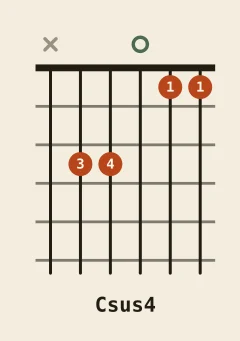
    C F GCsus4The third is replaced by the fourth. Put F on the lowest string instead and the same notes answer Fsus2.
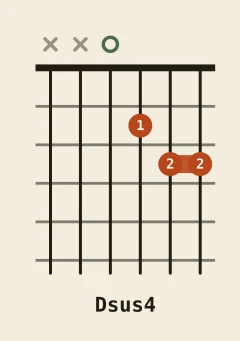
    D G ADsus4A suspended fourth at D, with no third anywhere in the shape to make it major or minor.
    C E G B DCmaj7Five notes, and no five-note Cmaj9 in the library: the tool answers with the largest chord inside them.

    Which shapes do players most often need to name?

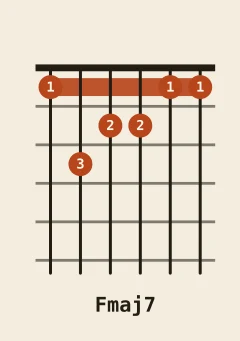
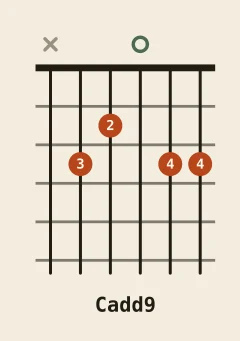
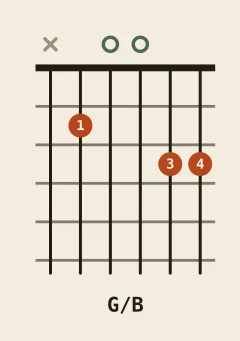
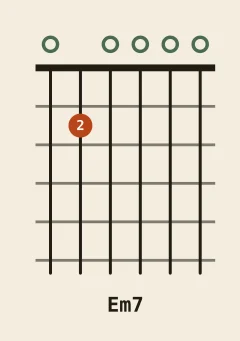
    Sevenths, suspended chords, added ninths and slash chords are the shapes that most often send a player looking for a name. Each diagram opens the full page for that chord, with every voicing up the neck and the songs that use it.
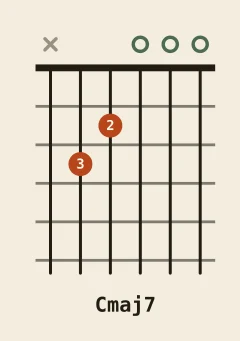
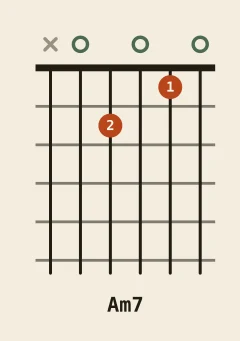
    Name the chords you already play

    The shapes most players meet first. Each one opens a full page with the fingering, the notes inside it and the songs that use it.

    Chord identifier FAQ

    How does the chord identifier work?
    It converts each fret you tap into the note that string sounds at that fret, using standard tuning (E A D G B E). Those notes become a set of pitch classes, and the tool compares that set against all 166 chords in our library. Matches come back in three groups. Exact matches use precisely the notes you tapped. Also fits lists chords whose notes are all contained in your selection, which is what happens when you add a colour tone on top of a familiar shape. Close matches are chords that need one or two more notes to be complete, and they are the best clue when a shape is only half formed. Inside the exact group the identifier also reads the lowest string you played, so the same three notes come back as C, C/E or C/G depending on which note is in the bass. Everything runs in your browser and nothing is uploaded.
    What chord is this if no exact match appears?
    Your shape is usually an incomplete chord, or a common chord with an extra colour note on top. Read the Also fits group first: a three-note shape like C E G is enough to name C major even when two other strings are ringing open, because those extra notes do not change the name. If nothing fits at all, remove one note at a time and watch the answer change with each tap. Removing notes one at a time is faster than re-tapping the whole shape. Two notes a fifth apart with nothing else is a power chord, so the identifier answers C5 rather than guessing major or minor. If even a single pair of notes returns nothing, the shape is probably a chord we do not publish, or a voicing with two notes a semitone apart that no common chord contains.
    Do I have to play all six strings?
    No. Two or three notes are usually enough, and you can mark any string you do not play as muted so it contributes nothing. The root and the third already decide major versus minor; add the seventh and the identifier separates Cmaj7 from C7. Two notes are enough to start, and the third is what usually settles the name. Muting matters more than players expect. The open high e string rings as E, which is a chord tone of C, A minor and E minor, so leaving it unmuted rarely hurts. The open B string is the note that turns a plain triad into a maj7 or an add9, so a stray B changes the answer and is worth marking as muted. When in doubt, tap only the strings you actually press and read the Close matches group: it names the chord you are one note short of.
    Can it name barre chords, power chords and slash chords?
    Yes, because the identifier reads notes rather than shapes. A barre chord at the 5th fret is recognised from the same note set as the open version, so an A-shape barre at fret 5 answers D, and the E-shape barre at fret 8 answers C. Two notes a fifth apart are reported with the power-chord name, such as C5, and the tool never invents a third that is not sounding. Barre shapes, power chords and inversions are all just note sets to the matcher, which is why none of them needs a separate mode. Slash chords work because it also reads which string sounds lowest: play the notes of C major with G on the lowest string and the answer is C/G rather than C, and the same three notes with E in the bass answer C/E. An unintended inversion is the usual reason a familiar shape comes back with an unexpected name.
    Why can the same notes have more than one chord name?
    Because a chord name describes a relationship to a root, and the same notes can be stacked from different starting points. C E G is C major; start the stack on E and the same three notes are an E minor shape with the third on the bottom; start on G and they read as G suspended. The bass note is the strongest clue a guitarist gives, which is why C/E and C/G are separate entries in the library even though all three shapes use the same three notes. Context decides the rest: what came before, what comes next, and which name the player expects. The identifier settles it by matching your lowest string first and ranking the remaining names underneath, so you can see every label the shape could carry instead of only the first one it found.