Free guitar tools
Fourteen tools that answer one question each, and run entirely in your browser. No signup, no install, nothing between you and the answer.
- tools
- 14 free
- chord shapes
- 166
- signup
- none
- works offline
- after first load
Pick one by what you are trying to do
I cannot name what I am playing
Tap the frets you are holding and the reverse chord finder tells you the name, the notes inside it and every other way to play it.
I want to practise something specific
Tune up first, then pick the drill: keep steady time, learn the notes on the neck, or get a strumming hand that does not think about it.
I am writing, transposing or teaching
Generate a progression in any key, work out what a capo really does to your shapes, and print blank chord paper for a class.
All 14 tools
Grouped by the job they do. Every one of them is a single page that works the moment it loads.
01 · Find itName it, spell it, map it
- 01Chord FinderTap a root and a chord type for the diagram, notes and audio, then play every voicing up a simulated fretboard.
- 02Chord IdentifierWhat chord is this? Tap the frets you are holding and the reverse chord finder names it, with the diagram and the sound.
- 03Chord BuilderPick any notes and see the chord they build, the interval recipe and every voicing.
- 04Scale FinderPick a root and a scale, then see every note across the whole neck.
- 05Song Key FinderEnter the chords of a song and find out what key it is in.
- 06Circle of FifthsEvery key, its chords and its modes on one interactive wheel.
02 · Practice itTune up, keep time, learn the neck
- 01Online Guitar TunerTune by ear with reference pitches, or let the microphone listen and guide you.
- 02Online MetronomeSteady tempo from 20 to 300 BPM, with tap tempo, time signatures and an accent on the one.
- 03Strumming PatternsThe essential strumming patterns with audio, from campfire to funk.
- 04Fretboard Notes ChartEvery note on the neck from fret 0 to 15, with any pitch highlighted and sharps or flats switched.
- 05Fretboard Note TrainerLearn every note on the neck with a timed game and a daily streak.
03 · Create & teachWrite with it, transpose it, print it
- 01Chord Progression GeneratorGenerate progressions in any key, hear them and transpose them.
- 02Capo CalculatorWhat key is that with a capo on the 3rd fret? Transpose shapes and sounding keys both ways.
- 03Blank Chord ChartsPrintable blank chord boxes, TAB paper and fretboard diagrams: free PDF-ready sheets for teachers.
Where most people start
Which tool answers which question
If you would rather start from the question than from the tool name, find your question here.
| The question | Tool | What you get |
|---|---|---|
| What chord am I playing? | Chord Identifier | The name, the notes inside it, and every other way to play it. |
| How do I play a C chord? | Chord Finder | The diagram, the notes, the audio and every voicing up the neck. |
| Which notes are in this chord? | Chord Builder | The interval recipe behind the chord and the shapes that match it. |
| What key is this song in? | Song Key Finder | The keys that fit the chords you enter, ranked by how many fit. |
| What key is this with a capo on 3? | Capo Calculator | The sounding key and the shapes to play, in both directions. |
| Is my guitar in tune? | Online Guitar Tuner | Reference pitches by ear, or a microphone that listens and guides you. |
| How fast is this song? | Online Metronome | Tap the beat to measure the BPM, then practise against the click. |
| Which scale fits these chords? | Scale Finder | Every note of the scale across the whole neck, in any key. |
| I need blank chord paper | Blank Chord Charts | Printable chord boxes, TAB paper and fretboard diagrams. |
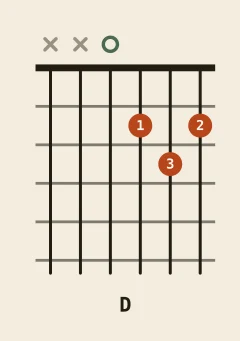
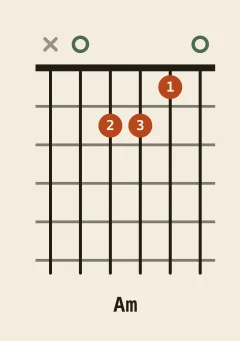
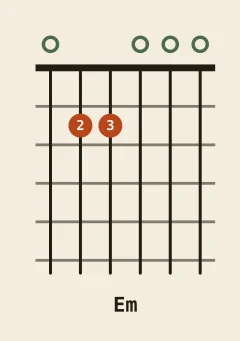
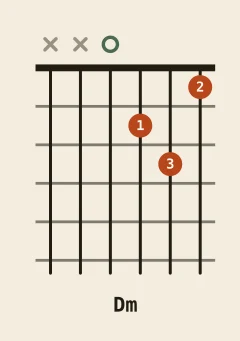
The eight chords every tool is built around
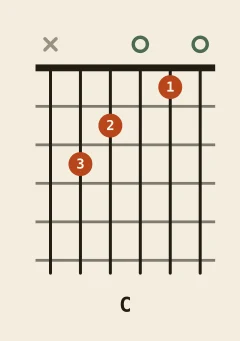
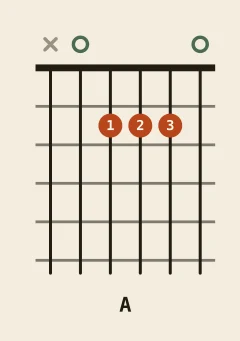
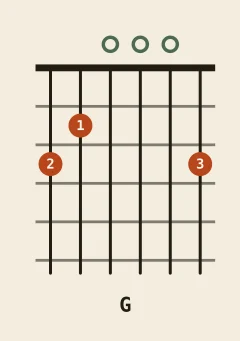
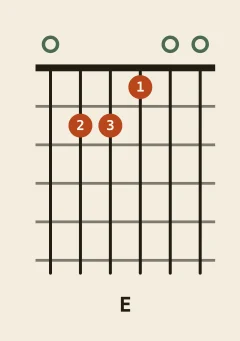
Five major and three minor shapes in the open position. Learn these and most of the beginner songbook opens up. Each diagram is a link to the full page.
Guitar tools FAQ
Do I need to install anything to use these tools?
Which guitar tool should a beginner start with?
Do these guitar tools work on a phone?
Can I use the tools offline?
Are the tools free, and what is the catch?
The tools find it. The library explains it.
A tool answers the question in front of you. When you want the notes, the fingerings and the songs a chord actually turns up in, that lives in the chord library and the song sheets.